 Présidentielle 2027arrow_right



Mixing Desk Rental for Events
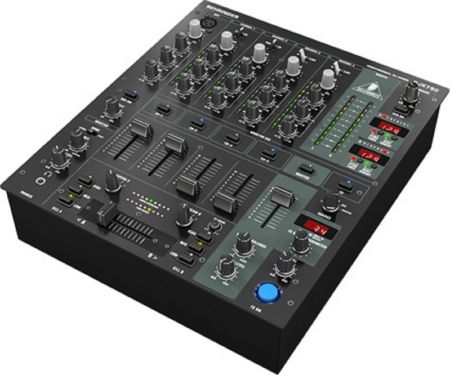
The mixing console is the control centre of an audio installation. It lets you connect several sources, adjust levels, balance microphones, manage background music and send the signal to the speakers. It becomes essential as soon as an event goes beyond very basic audio playback.
Mixing console rental covers conferences as well as evening events, product launches, conventions, video sets, animated stands and events with a DJ. It centralises the audio inputs: wired microphones, wireless microphones, computer, media player, DJ controller, smartphone, video control desk or any other peripheral.
For a conference, a mixing console makes it easier to manage several speakers. It lets you set the level of each microphone, mute a source when necessary and adapt the volume to the room. For an evening event or musical entertainment, it lets you control the audio sources and maintain a consistent level throughout the event.
Depending on your configuration, mixing can be used to:
- Manage several microphones during a panel discussion;
- Connect a computer to play a video or a presentation;
- Run background music;
- Hook up a DJ desk or an external source;
- Balance the sound between different playback zones.
The choice of mixing console depends on the number of inputs required, the type of sources, the outputs to be provided, the expected settings and the level of autonomy wanted by the team on site. A small configuration can make do with simple mixing, while a more technical event will require more inputs, more controls and sometimes operation by a technician.
Solutions Événements offers mixing equipment rental tailored to event needs. The console can be integrated into a complete sound system with speakers, microphones, cables, stands and peripherals to ensure a reliable, clear installation for speakers and organising team alike.
When do you need a mixing console?
Plan for a mixing console as soon as you have several audio sources: several microphones, a computer, background music, a video control desk or a DJ source. It lets you set the volumes and secure the playback.
How many inputs does a mixing console need?
Count one input per source: a microphone, a computer, a player or a DJ output. It is wise to allow one or two extra inputs for an unexpected need or a change of configuration.
Is a mixing console necessary for two microphones?
Not always, but it becomes useful if you want to adjust the volumes separately, connect a music source or control the sound from a single point. For a conference, it brings more flexibility and security.
Can you plug a computer into a mixing console?
Yes, with the right connections. You need to check the computer's audio output, the cabling distance and the type of input available on the console. This configuration is common for videos, presentations and background music.
Do you need a technician to operate a mixing console?
For a simple configuration, a briefed team member can manage the basic levels. For a major conference, a panel discussion or an event with several sources, having a technician on hand is recommended to anticipate settings and step in quickly.